Agentive Overviews for Family Coordination
Designing calm, glanceable, and portrait-based systems for parents of school-age children. A concept-driven study (DD202A) at Kristianstad University.
The Problem: Fragmented Channels, Not Missing Information
SECTION 01Parents of school-age children don’t lack information about their week, they struggle to assemble it into a coherent picture. Coordination data is scattered across shared calendars, school communication platforms, messaging apps, and location-sharing services. Notifications arrive continuously, often detached from the moment they’re relevant. The result is not an information deficit but a retrieval and assembly problem that demands significant cognitive effort.
CDIDR Framing
SECTION 02This project follows Concept-Driven Interaction Design Research (CDIDR; Wiberg & Stolterman, 2010), where a theoretical concept guides inquiry, prototyping, and evaluation.
Theoretical Starting Point: Three Converging Streams
SECTION 03Family coordination research shows that domestic scheduling is a socio-material practice sustained through negotiation, environmental cues, and peripheral awareness, not through centralised information systems. Calm technology offers an alternative to interruptive delivery by allowing information to move between centre and periphery as needed. Agentive systems research explores how AI can mediate attention without replacing human judgment.
These three positions share a common orientation: human judgment over system automation, ambient availability over interruptive delivery, and sufficient abstraction over exhaustive detail. Together they define the theoretical space this project inhabits.
Research Questions
SECTION 04RQ1
How can an agentive overview of family commitments be designed to reduce perceived channel fragmentation and notification overload for parents of school-age children?
RQ2
In what ways might AI summarise and re-present distributed family schedule information to support quick, shared decisions without requiring focused engagement?
Field Insights: Five Themes From Empirical Interviews
SECTION 05Eight interviews across two phases, supported by sketch-based probes and a technology probe deployment, grounded the concept in lived coordination practices. Five themes emerged.
Fragmentation & Retrieval Effort
Information relevant to coordination was distributed across school apps, messaging channels, email threads, and shared calendars. Parents described searching for the same piece of information multiple times, or relying on memory because finding the source felt harder than guessing.
Overview Without Depth
Parents wanted “one place” to understand the week, not to centralise all details, but to reduce the cognitive effort of consulting many sources. The goal was a quick sense of who was doing what, when, and whether anything needed attention.
Coarse-Grained Cues
Phrases like “on the way home,” “still at school,” or “free later” were described as more useful than exact locations or timestamps. What mattered for coordination was whether a plan was feasible or someone was available.
Predictable, Bundled Updates
Parents valued low-frequency, predictable updates, like morning summaries and pre-evening check-ins, over constant micro-notifications. Older, slower forms of communication were referenced positively: paper schedules on the fridge, a shared whiteboard in the hallway.
Degree of Agency
Participants wanted help that reduced retrieval effort, but not at the cost of feeling that decisions were made for them. The acceptable band was narrow: AI should clarify and prepare, not act autonomously.
The Concept: An Agentive, Glanceable Overview
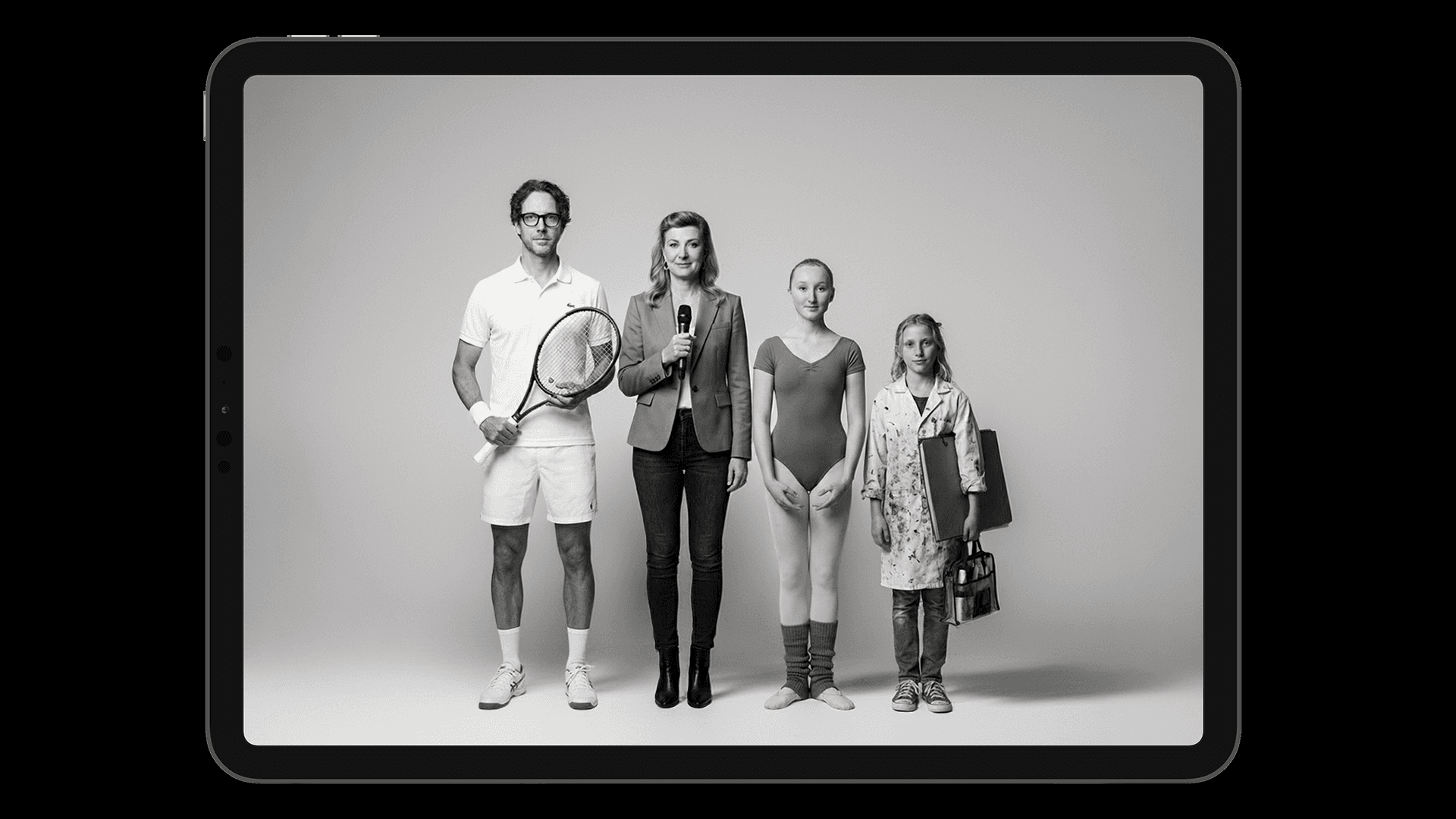
SECTION 06An ambient display that represents each family member through AI-generated portraits and contextual attributes. Attributes, including clothing, objects, accessories, and environmental cues, serve as visual shorthand for the week’s activities. When an event needs attention, it surfaces through the portrait. When someone claims responsibility, it visually resolves. The display sits in a shared domestic space: a wall, a shelf, a counter where family members pass.
Portrait + Attribute
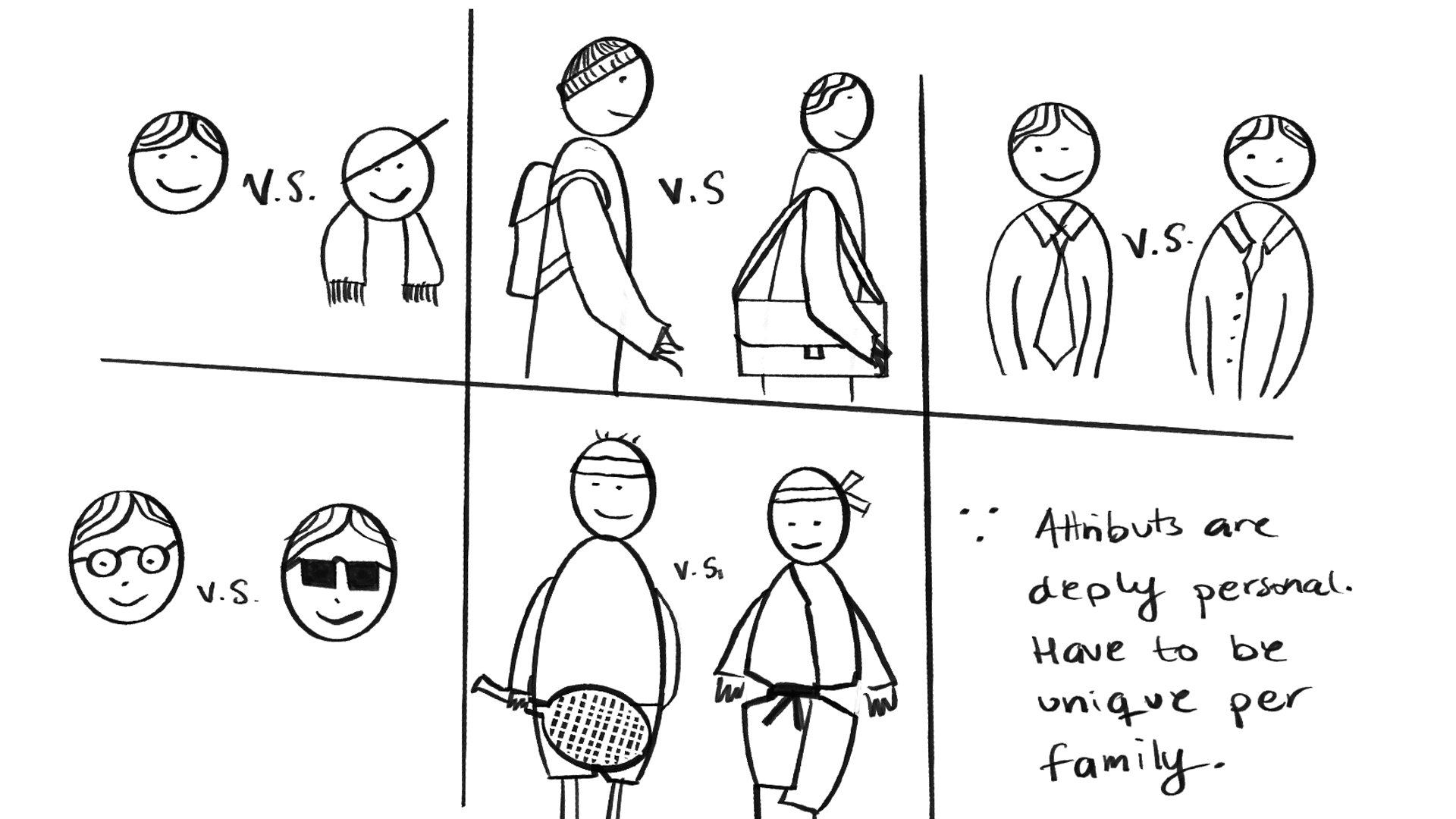
Identity is separated from context. Each family member has a stable portrait that serves as a visual anchor. Layered onto this are variable attributes: a tennis racket signals sports practice, a school desk signals exams, a packed bag signals travel. These visual shorthands operate at the level of feasibility judgment, not scheduling precision.
Temporal Layering
The display creates visual depth across the week. Immediate activities appear prominently in the foreground. Approaching events emerge gradually in the background. As the week progresses, completed events recede and upcoming ones move forward, a soft transition model that avoids the discrete state changes of notification-based systems.
Claimed = Handled
A family member doesn’t need to know how something is handled; only that it is. When someone claims an event, it visually resolves in their portrait. A binary model (needs attention vs. claimed) replaces multi-level urgency, reflecting the interview finding that coarse-grained cues are sufficient for coordination.
The Role of AI
AI operates as a summarising layer, not as a decision-maker. It automatically aggregates, classifies, and re-presents distributed coordination signals as portrait attributes at the information layer, while claiming and handling remain fully manual at the family’s decision and action layer.
Design Process: Concept-Driven Interaction Design Research
SECTION 07The process combined iterative concept development, internal critique documented through a design log, and external critique through design supervision. The concept was progressively refined through sketching, prototyping, and implementation.
A technology probe was deployed with two families over two days to evaluate the concept in everyday family coordination contexts.
Key Insights: What the Design Process Revealed
SECTION 08From Notification Filtering to Weekly Overview
The original framing centred on interruption management. Interviews revealed that families had already learned to cope with notification volume. The real need was not filtering interruptions but assembling a coherent sense of the week from scattered sources.
Group Portrait to Individual Portraits
Three approaches to composite family portraits via API were attempted and abandoned. Single-image generation lacked compositional control. Separate renders introduced inconsistent scale. The pivot to individual portraits opened finer-grained per-person state communication, a design finding in itself.
Conversational vs. Programmatic AI
Conversational prompting (ChatGPT-style) achieved compositional nuance that API-driven generation could not reproduce. The gap between what AI can do conversationally and what it can produce programmatically is itself a contribution of the design process.
Colour Overlay as Coordination Cue
Icon or emoji overlays broke the calm impression. They felt like notifications imposed on the image. A reddish colour overlay proved more coherent: the portrait itself shifts tone rather than having an alert stacked on top, staying true to the ambient quality the display aims to achieve.
Design Space: Five Dimensions for Agentive Weekly Overviews
SECTION 09Five interview themes were translated into five design dimensions that map how an AI-assisted overview differs from current app-based coordination tools. Each dimension corresponds to a specific empirical finding and positions the concept relative to existing tools. Together, these dimensions frame how an overview can remain peripheral, contextual, and supportive of shared awareness.
Design Principles: Three Principles From Theory and Practice
SECTION 10Design for judgment, not precision
Parents assess feasibility rather than exactness. The prototype’s use of coarse-grained attributes over detailed schedules reflects this, aligning with calm technology’s emphasis on abstraction over exhaustive detail.
Use AI to reshape information, not to control decisions
Participants valued assistance that clarified rather than automated. The prototype positions AI as a summarising agent that aggregates and re-presents without inferring intent, initiating action, or making scheduling decisions.
Support shared rhythms through ambient placement
The preference for predictable, bundled updates and the positive response to ambient placement suggest that coordination tools benefit from operating on domestic temporal rhythms rather than stochastic notification regimes.
Technology Probe Findings: What the Deployment Revealed
SECTION 11The technology probe evaluation confirmed the legibility of the visual signalling approach: the red colour overlay for unclaimed activities was immediately understood by both families. It also surfaced new design directions not anticipated during internal critique, including conflict detection between overlapping family commitments, temporal proximity as an additional signal layer, and hallway placement as a more actionable location than the kitchen.
Conclusion: Greater Clarity, Not Greater Detail
SECTION 12Parents of school-age children face a constant flow of calendar updates, school messages, chats, and notifications. The central problem is not missing data, but the effort required to assemble scattered signals into a coherent understanding of the week.
This thesis contributes empirical grounding from interviews across two phases, a five-dimensional design space for agentive weekly overviews, and a concept prototype evaluated through technology probe deployment.
The key design argument is that AI should classify, aggregate, and re-present information while preserving human interpretive control. The strongest opportunity is therefore not exhaustive family planning interfaces, but ambient displays that help families see their week with greater clarity.
Technology Probe — Try It
Try the Technology Probe
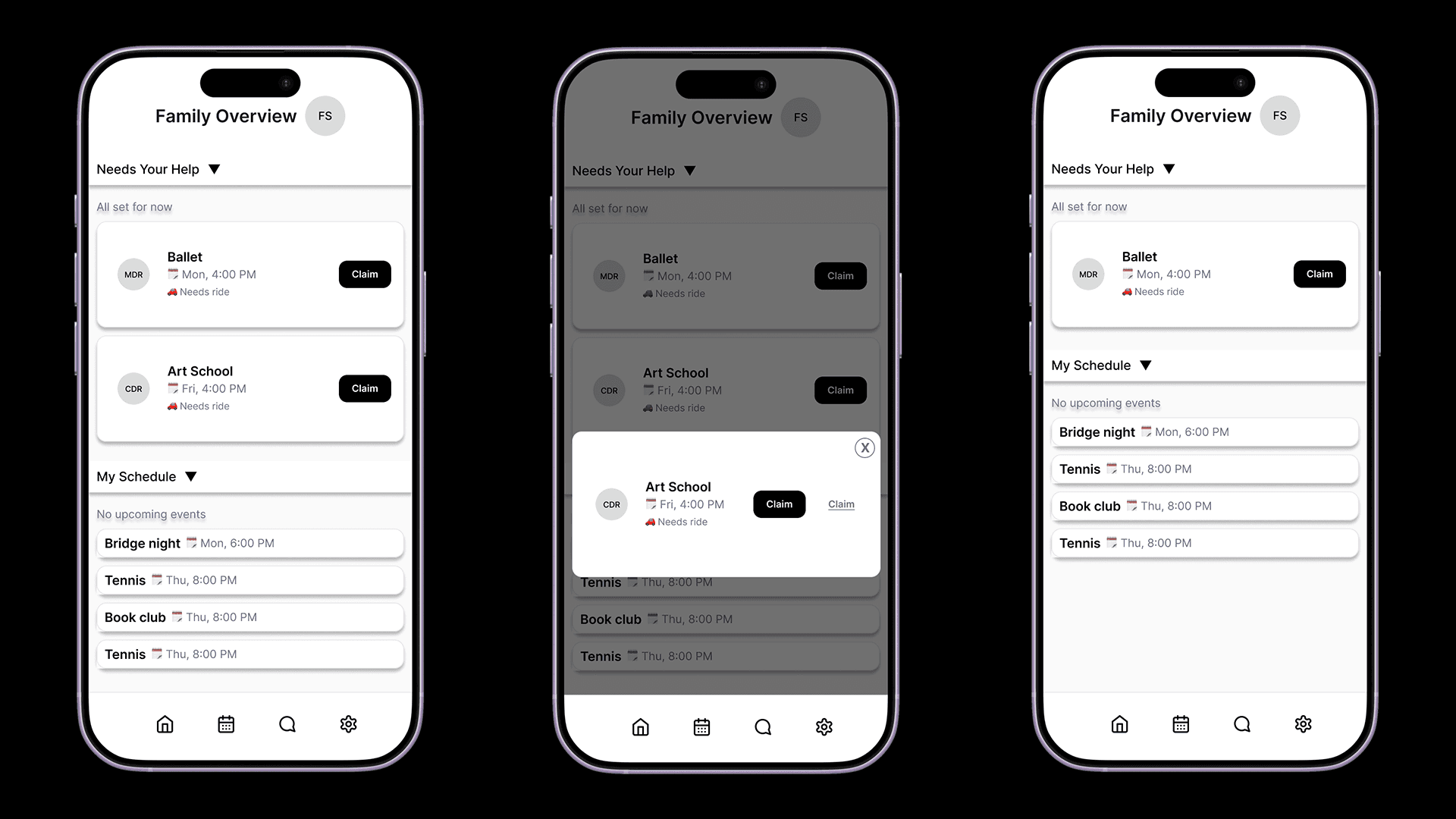
The prototype was deployed as a technology probe with two families. It consists of a companion app for managing family members and events, and an ambient display that shows AI-generated portraits reflecting the week’s coordination state.
To get started: add family members with a name, role, and reference photo. Add events using the form or the chat interface. Open the ambient display on a tablet or second screen to see the portraits update. Don’t forget to bookmark your family to log in again.
For first-time onboarding, use a phone for the smoothest flow. After setup, the family view works well on laptop, tablet, and desktop.
Fredrik Sjöberg · HKR 2026
Supervisor: Kristoffer Åberg
Design supervision: Mattias Rylander
Examiner: Martin Wetterstrand
Master’s Programme in Digital Design (DD202A), Kristianstad University